If you’re comparing kinsta vs wpengine, you’re likely looking for a high-performance managed WordPress host that can handle speed, security, and scalability without the headaches of server management. Both Kinsta and WP Engine are premium hosting providers trusted by businesses, agencies, and high-traffic websites — but they differ in infrastructure, pricing, features, and overall user experience.
In this detailed comparison, we’ll break down performance, pricing, support, scalability, security, and more to help you determine which platform is the better choice for your specific needs.
This Kinsta vs wpengine comparison is designed to give you a clear, side-by-side breakdown so you can confidently choose the right managed WordPress host.
Table of Contents
Performance & Speed Comparison
When it comes to performance and speed, the battle of kinsta vs wpengine is often one of the most decisive factors for buyers. Both platforms are engineered for fast-loading WordPress sites, but they take slightly different approaches to achieve high performance.
Server Infrastructure & Global Network
Kinsta runs exclusively on the Google Cloud Platform premium tier network. Every site is hosted in isolated containers that deliver dedicated resources and consistent performance even under spikes in traffic.
WP Engine uses a combination of cloud providers (including Google Cloud and AWS depending on your plan), giving flexibility in infrastructure but slightly more variability in performance consistency across plans.
Caching Architecture
Caching is central to how fast a WordPress site loads:
- Kinsta uses server-level caching and integrates a custom caching stack optimized for WordPress sites. It also offers built-in CDN support (via KeyCDN) to deliver static content quickly to users around the world.
- WP Engine uses its proprietary EverCache® technology, a smart caching layer that automatically caches content and reduces server load. WP Engine also includes CDN support via integration with global networks.
Both hosts ensure that frequently accessed content is served rapidly without repeated requests to the origin server.
PHP Performance & Resource Allocation
In the kinsta vs wpengine comparison, both providers use modern PHP versions and optimize their stacks for WordPress:
- Kinsta allows you to select supported PHP versions and switch between them easily in the dashboard.
- WP Engine also supports current PHP versions and provides options for performance tuning.
However, Kinsta’s isolated container technology often delivers more predictable resource allocation per site, which can translate into faster performance under load.
Real-World Speed Tests
Benchmark tests (including GTmetrix, Pingdom, and Google PageSpeed Insights) often show:
- Kinsta delivering exceptionally fast Time to First Byte (TTFB) and superior performance on dynamic content.
- WP Engine posting strong speed scores as well, particularly on static content and with caching enabled.
Both hosts are more than capable of serving fast sites, but in many head-to-head tests, Kinsta edges out slightly due to its dedicated resource allocation and premium cloud network.
Global Content Delivery (CDN)
A global CDN is crucial for delivering content quickly to visitors worldwide:
- Kinsta includes a built-in CDN powered by KeyCDN.
- WP Engine offers CDN access, though availability and performance can depend on the plan you choose.
Having a strong CDN reduces latency and improves load times for international users, which is a key advantage for global audiences.
In the performance & speed portion of the kinsta vs wpengine comparison:
- Both hosts deliver excellent performance for WordPress websites.
- Kinsta often leads with slightly better consistency and speed due to premium network infrastructure and isolated containers.
- WP Engine performs extremely well with its EverCache® technology and scalable cloud options.
Ultimately, both platforms are high-performance choices — but if pure speed and resource consistency are your top priorities, Kinsta tends to have a slight edge.
Hosting Infrastructure & Technology Stack
Overall, the Kinsta vs wpengine infrastructure comparison highlights two powerful but slightly different cloud approaches.
Understanding the hosting infrastructure and technology stack is crucial when comparing kinsta vs wpengine, because it directly impacts performance, reliability, and scalability. While both are premium managed WordPress hosts, they use different architectural choices and technologies under the hood.
Core Architecture
Kinsta
Kinsta is built entirely on the Google Cloud Platform (GCP) using its premium tier network. Every WordPress site on Kinsta runs in isolated LXC containers, meaning each site gets dedicated resources (CPU, RAM, etc.) that aren’t shared with other customers. This design helps maintain stable performance, especially during traffic spikes.
WP Engine
WP Engine uses a multi-cloud approach depending on the plan. They partner with major cloud providers like Google Cloud and Amazon Web Services (AWS). This gives flexibility and the potential for global scalability, though infrastructure experiences can vary slightly based on the specific cloud backend used for a plan.
Server Environment & Software Stack
For both kinsta vs wpengine, the technology stack includes optimized versions of the following components important for WordPress:
- NGINX web server: Handles HTTP requests quickly and efficiently.
- Latest supported PHP versions: Both platforms support up-to-date PHP releases that improve speed and security.
- MySQL or MariaDB databases: Tuned for WordPress performance.
- Server-level caching: Built into their infrastructure without additional plugins.
Kinsta’s stack is more uniform since every plan uses the same GCP-based environment. WP Engine’s stack may vary slightly due to its flexible cloud provider support and differing configurations by plan.
Containerization vs Platform Services
Kinsta’s container-based infrastructure gives each site a sandboxed environment:
- Predictable resource allocation
- Better isolation between sites
- Reduced interference from neighboring accounts
WP Engine does not use isolated containers in the same way. Instead, they rely on platform services and caching layers to manage performance and separation between accounts.
Caching & Performance Enhancers
Both hosting providers include advanced caching directly in their stack:
- Kinsta: Server-level cache and reverse proxy caching built-in, with automatic cache clearing on updates.
- WP Engine: Uses proprietary EverCache® technology — a sophisticated caching system designed for WordPress. EverCache® can intelligently cache pages and reduce backend processing.
The inclusion of caching at the infrastructure level means you don’t need third-party caching plugins — a benefit for many users.
CDN Integration
Global Content Delivery Networks (CDNs) play a major role in speeding up site delivery around the world:
- Kinsta: Offers an easy, built-in CDN integration with global POPs included in plans.
- WP Engine: Provides CDN integration as well — sometimes included depending on the plan level.
A strong CDN reduces latency and helps serve assets like images, CSS, and JavaScript quickly to visitors regardless of where they are located.
Security & Platform Hardening
Infrastructure-level security is part of what makes kinsta vs wpengine a compelling comparison:
- Both use firewalls, malware detection, and active threat blocking.
- Kinsta runs on GCP’s secure private network.
- WP Engine benefits from the security tooling available through its cloud platforms and proprietary systems.
Infrastructure-level protections help prevent attacks before they reach your WordPress installation.
In the kinsta vs wpengine infrastructure comparison:
- Kinsta offers a consistent, container-based environment on Google Cloud with dedicated resources and uniform performance characteristics.
- WP Engine provides flexibility with multi-cloud support, leveraging the strengths of both AWS and Google Cloud.
Both stacks are modern, secure, and optimized for WordPress — but if you value predictable resource isolation and a uniform backend environment, many users find Kinsta’s infrastructure easier to manage and more performance-consistent.
Ease of Use & Dashboard Experience
In the broader Kinsta vs wpengine discussion, ease of use can be a deciding factor for many non-technical users.
One of the most important factors when comparing kinsta vs wpengine is how easy each platform is to use — especially if you’re managing multiple sites, performing updates, or guiding clients who aren’t tech-savvy. A clean, intuitive dashboard can save time, reduce confusion, and improve overall workflow.
Onboarding & Getting Started
Kinsta
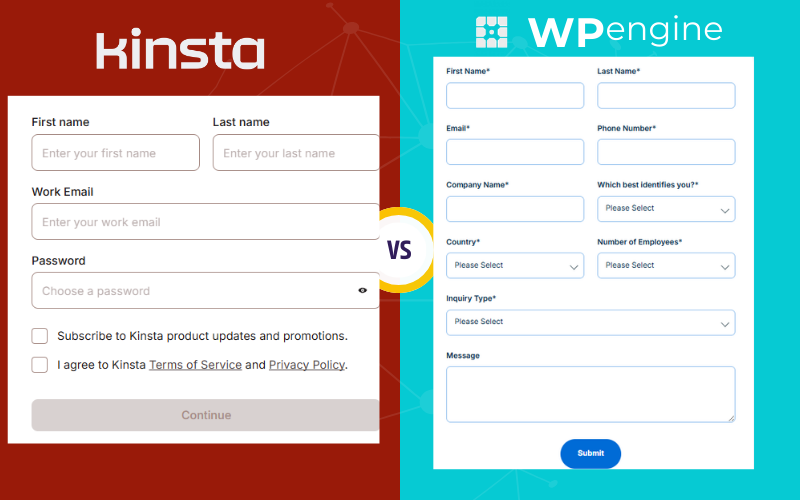
Kinsta’s onboarding process is streamlined and beginner-friendly. After signing up, users are guided to create their first WordPress site with clear, step-by-step prompts. The initial setup feels modern and welcoming, even for less technical users.
WP Engine
WP Engine also offers straightforward site setup, but the experience is more utilitarian. It’s designed for speed and efficiency, yet some first-time users may find the interface a bit more cluttered compared to Kinsta.
Dashboard Design & Navigation
Kinsta Dashboard
Kinsta’s custom dashboard — called MyKinsta — is one of its biggest user experience highlights. It’s clean, organized, and easy to navigate. Key actions like accessing sites, backups, tools, and analytics are clearly labeled and require minimal clicks.
WP Engine Dashboard
WP Engine’s dashboard is functional and packed with tools, but the layout can feel overwhelming, especially for beginners. Users who manage multiple environments (e.g., staging and production) may need a moment to adjust.
Site Management Tools
Both platforms provide essential tools for managing your WordPress sites, but the ease of use differs slightly:
Kinsta:
- One-click staging environment
- Easy backup access & restore
- Quick access to caching and redirect tools
- Fast environment switching
WP Engine:
- One-click staging sites
- Advanced tools like debugging and Git integration
- Environment comparisons
- Performance tools integrated throughout dashboard
Kinsta’s tools are easier to find and use without reading documentation, while WP Engine’s can feel more powerful but less immediately obvious.
Monitoring, Analytics & Insights
Kinsta includes built-in analytics for:
- Traffic
- Bandwidth usage
- PHP performance
- CDN usage
These insights are displayed clearly within the dashboard, making site performance easy to monitor without third-party plugins.
WP Engine also offers analytics and performance insights, including:
- Popular content performance
- Visitor trends
- Server response times
However, some metrics may require exploring multiple tabs or sections.
Support Access from Dashboard
When you compare kinsta vs wpengine, support accessibility is another UX factor:
- Kinsta: Chat support is available directly inside the dashboard with easy access.
- WP Engine: Support links and tools are present, but navigating to live chat or help resources can take an extra click or two.
Embedding support tools directly within context (e.g., while viewing a site) improves the overall user experience.
In the ease of use & dashboard experience comparison:
- Kinsta stands out for its modern, intuitive dashboard and straightforward navigation — ideal for beginners and agencies alike.
- WP Engine offers powerful tools and functionality, but its interface can feel more complex, especially for new users.
If simplicity, clean design, and a user-friendly experience rank high on your priority list, Kinsta typically offers a smoother dashboard experience.
Pricing & Value for Money
When analyzing Kinsta vs wpengine, pricing and overall value for money is critical because both are premium managed WordPress hosting providers that cost more than basic shared hosts but offer far greater performance, support, and reliability.
Kinsta’s pricing is transparent and straightforward, with each plan bundling essential features such as built-in CDN, daily automatic backups, staging environments, free SSL, and managed WordPress support. Kinsta’s plans are based on monthly visits and site count, and while the base price may seem higher compared to entry-level shared hosting, most valuable tools are included, reducing the need for add-ons or upgrades.
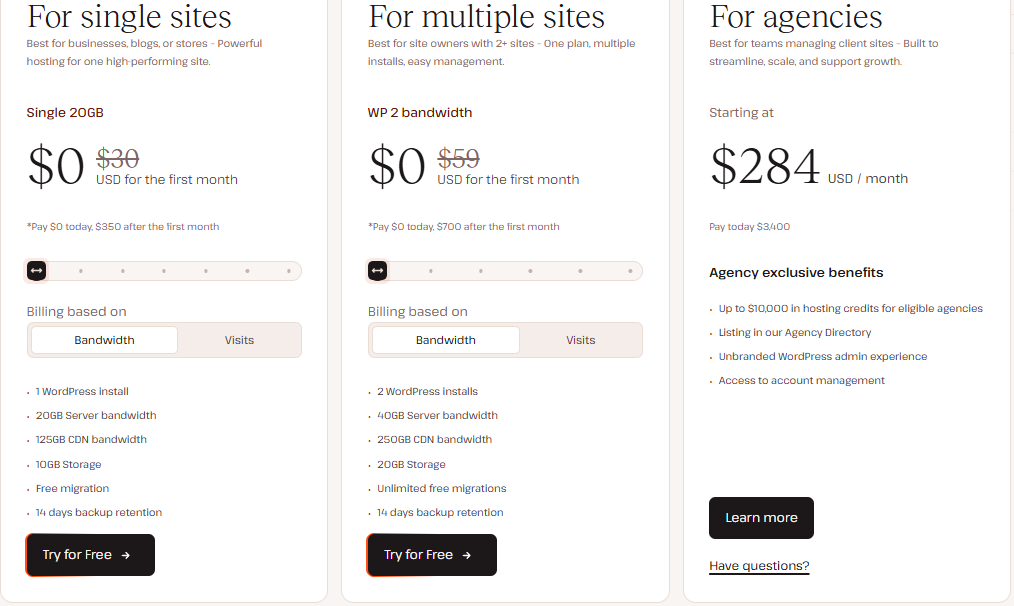
WP Engine also offers tiered pricing with managed WordPress hosting plans that include performance tools like EverCache®, staging environments, security features, and basic support. However, some advanced features — such as premium CDN access or developer tools — may require higher-tier plans or add-on purchases, which can make the total cost less predictable for users who want everything included.

When comparing entry-level plans in the kinsta vs wpengine comparison, both start at a mid-range price point relative to shared hosting, but Kinsta generally includes more features at the base level. In contrast, WP Engine’s modular pricing structure may appeal to users who want to customize their stack but could increase costs for users requiring full functionality.
For mid-tier and enterprise plans, both hosts scale with traffic and resource needs, offering higher visit limits, improved performance, and expanded support options. Kinsta’s value often comes from its all-inclusive approach, while WP Engine’s flexibility allows users to pick and choose specific upgrades or advanced capabilities.
In the pricing & value for money comparison of kinsta vs wpengine, Kinsta typically delivers clearer value with predictable pricing and many essential features included, whereas WP Engine provides flexibility with advanced tools but requires careful plan selection to ensure you’re getting everything you need without unexpected costs.
Scalability & Traffic Handling
Scalability is another critical dimension of the Kinsta vs wpengine decision process.
When choosing between hosts, understanding how well they handle growth and traffic spikes is essential — especially for businesses, eCommerce stores, or high-traffic blogs. In the kinsta vs wpengine comparison, both providers are built to scale, but their approaches and limits differ.
Built for Growth
Kinsta and WP Engine are both managed WordPress hosts that go beyond basic shared hosting; they are designed to support sites that grow over time.
- Shared hosts often struggle with traffic spikes and resource limits.
- Managed hosts like Kinsta and WP Engine allocate resources, caching layers, and global infrastructure that help keep sites fast even under heavy load.
Because of this, both platforms are excellent choices if you expect your traffic to increase or fluctuate.
How Kinsta Handles Traffic
Kinsta uses a container-based architecture on the Google Cloud Platform (GCP). Each WordPress site is hosted in its own container with dedicated resources (CPU, memory, etc.), which means:
- High traffic won’t interfere with other sites.
- Resource allocation remains stable during spikes.
- You can scale up by moving to a higher plan or purchasing add-on resources.
Kinsta’s built-in caching and CDN also help reduce server load by serving static resources quickly, which is crucial during sudden traffic surges.
How WP Engine Handles Traffic
WP Engine also scales well and is built to support sites with heavy traffic. Its architecture leverages powerful caching (EverCache®) and cloud infrastructure (Google Cloud or AWS) to manage performance.
WP Engine’s traffic handling strengths include:
- Intelligent caching that reduces backend load.
- Integration with global CDNs to serve content closer to users worldwide.
- Upgrade paths to higher plans that support more visits and higher resource allocation.
Because WP Engine uses multiple cloud providers depending on the plan, some users might experience differences in performance behavior, but this also brings flexibility.
Traffic Limits & Overage Handling
When comparing kinsta vs wpengine for scalability, it’s important to understand how traffic limits and overages work:
Kinsta
- Plans are based on monthly visit limits.
- Exceeding limits results in additional traffic charges.
- Easy upgrade options to higher tiers.
WP Engine
- Plans are based on visitor limits and server resources.
- Overage charges or forced upgrades may occur if limits are exceeded.
- Some plans include additional features like premium CDN access that improve handling during traffic spikes.
Understanding your expected traffic patterns can help you choose the plan that matches your needs without unexpected costs.
Auto-Scaling & Burst Traffic
Neither host offers true auto-scaling in the way cloud platforms like AWS Lambda do (i.e., instant horizontal scaling without a plan change), but both allow you to upgrade quickly if you need more capacity.
For example:
- You can jump to a higher plan in the dashboard.
- Both platforms can support enterprise-level traffic with dedicated or custom solutions.
This makes both options suitable for growing businesses with increasing performance demands.
Real-World Performance During Traffic Surges
In real tests and real use cases:
- Kinsta tends to deliver consistent performance due to the container isolation and premium cloud network.
- WP Engine performs extremely well with its caching and CDN infrastructure, especially on static assets.
Both platforms keep sites running smoothly under load, but if your site frequently experiences sudden, unpredictable surges, Kinsta’s resource isolation can help prevent performance degradation.
In the scalability & traffic handling comparison of kinsta vs wpengine:
- Kinsta offers predictable scalability with containerized hosting and straightforward upgrade paths — ideal for sites with variable or growing traffic.
- WP Engine provides powerful caching and cloud flexibility to handle high traffic, though its scaling behavior may vary by plan and backend infrastructure.
Both hosts are exceptional choices for sites that expect growth, with Kinsta slightly favoring predictable performance and WP Engine offering flexible cloud options.
Security Features & Protection
Security remains one of the strongest areas in the Kinsta vs wpengine comparison.
Security is one of the most important factors to consider when evaluating kinsta vs wpengine, especially if you’re hosting business, eCommerce, or high‑traffic WordPress sites. Both providers offer strong security measures, but they implement them in slightly different ways.
Proactive Security at the Server Level
Both Kinsta and WP Engine take a proactive approach to security, meaning they aim to prevent issues before they affect your site.
Kinsta
- Uses the secure Google Cloud Platform (GCP) network, benefiting from Google’s enterprise‑grade security infrastructure.
- Applies software‑level hardening and firewalls to block malicious traffic.
- Offers DDoS protection and uptime monitoring to catch attacks early.
- Performs automatic detection and blocking of common threats.
WP Engine
- Utilizes built‑in firewall protections and threat detection tools.
- Includes automated monitoring for suspicious activity.
- Leverages security tools available through its cloud providers (Google Cloud and AWS).
- Offers IP‑based blocking and advanced threat prevention.
Malware Scanning & Removal
Both hosts provide malware scanning, but their approaches differ:
- Kinsta automatically scans for malware and offers remediation assistance in the event of a security breach.
- WP Engine actively monitors for malware and potential vulnerabilities, with alerts and protections based on detected risks.
While neither host guarantees full automatic removal of all threats, both provide teams and tools to help you respond quickly if issues arise.
SSL Certificates & Encryption
Secure Sockets Layer (SSL) encryption is essential for protecting user data and improving SEO:
- Kinsta includes free SSL certificates through Let’s Encrypt, easily activated within the dashboard.
- WP Engine also offers free SSL certificates that can be installed with a few clicks.
This means your site visitors will be protected by HTTPS, encrypting data between their browsers and your server.
Automated Backups
Backups are a critical layer of security — they allow you to restore your site if something goes wrong.
- Kinsta includes daily automatic backups on all plans, plus optional hourly backups on higher tiers.
- WP Engine also offers automated daily backups and lets you create manual backups before making major changes.
Both hosts make it easy to restore your site to a previous version, giving peace of mind against accidental changes or security issues.
Two‑Factor Authentication (2FA)
Adding two‑factor authentication (2FA) helps prevent unauthorized access to your hosting dashboard:
- Kinsta supports 2FA for all users, strengthening login security.
- WP Engine also supports 2FA, providing extra protection for account administrators.
Implementing 2FA ensures even if someone obtains your password, they still can’t easily access your account.
Uptime Monitoring & Alerts
Uptime is directly tied to security: early detection of downtime helps you respond to potential attacks faster.
- Kinsta performs uptime checks every two minutes.
- WP Engine maintains robust uptime monitoring with alerts when issues are detected.
Both hosts proactively notify you if your site goes down, helping you take immediate action.
Built‑In WordPress Hardening
WordPress itself requires additional layers of protection, and both hosts implement best‑practice hardening techniques:
- JavaScript security policies
- Restriction of sensitive file access
- Prevention of common WordPress exploits
These protections help safeguard your installation beyond typical plugin‑based defenses.
In the security features & protection comparison of kinsta vs wpengine:
- Kinsta emphasizes proactive security via Google Cloud’s infrastructure, automated malware detection, and strong firewalls.
- WP Engine delivers enterprise‑grade protections with firewalls, threat detection, and cloud‑backed infrastructure.
Both providers offer excellent security suited for business and professional WordPress sites. If you want a security setup that’s deeply integrated into a modern cloud infrastructure with minimal manual steps, Kinsta often feels more streamlined — while WP Engine gives powerful tools and flexibility for users who want configurable enterprise defenses.
Backup & Restore Options
Reliable backups are essential for any WordPress site, especially when considering premium hosting. In the kinsta vs wpengine comparison, both providers offer robust backup and restore solutions that ensure your website can recover quickly from errors, hacks, or accidental changes.
Automated Backups
Kinsta
- Performs daily automatic backups for all sites by default.
- Offers optional hourly backups on higher-tier plans for sites with frequent updates.
- Backups are stored for 14 to 30 days, depending on your plan.
- All backups can be restored with a single click from the MyKinsta dashboard.
WP Engine
- Provides daily automated backups on all plans.
- Also allows manual backup points before major updates or migrations.
- Backup retention ranges depending on plan, typically 14 days for standard plans and longer for premium tiers.
- Restoration is straightforward and can be done via the WP Engine dashboard.
One-Click Restore
Both hosts allow you to restore your website easily:
- Kinsta: One-click restore for full site recovery or for restoring backups to staging environments.
- WP Engine: One-click restore options, with the ability to restore to production or staging.
This feature is particularly valuable for testing updates, plugin changes, or troubleshooting issues without risking your live site.
Manual & On-Demand Backups
Kinsta: You can create manual backups anytime, which is useful before making significant site changes.
WP Engine: Offers manual backup points as well, allowing you to capture your site state exactly when needed.
Backup Storage & Security
- Kinsta stores backups securely on Google Cloud, ensuring redundancy and encryption.
- WP Engine stores backups across multiple locations in their cloud infrastructure, with encryption for added security.
Both hosts ensure that backups are not only reliable but also protected from unauthorized access.
Staging Environment Integration
Both Kinsta and WP Engine integrate backups with staging environments, which allows you to:
- Restore a backup to a staging site for testing before going live.
- Test updates, new plugins, or theme changes safely.
This reduces the risk of downtime or errors on your live site.
In the backup & restore options comparison of kinsta vs wpengine:
- Kinsta offers daily and optional hourly backups, secure storage, and simple one-click restore with seamless staging integration.
- WP Engine provides daily backups, manual backup points, and secure cloud storage, also integrated with staging.
Both platforms ensure peace of mind by safeguarding your WordPress site, but Kinsta is often praised for its intuitive backup interface and easy restore workflow, making it slightly more user-friendly for site administrators.
Customer Support Comparison
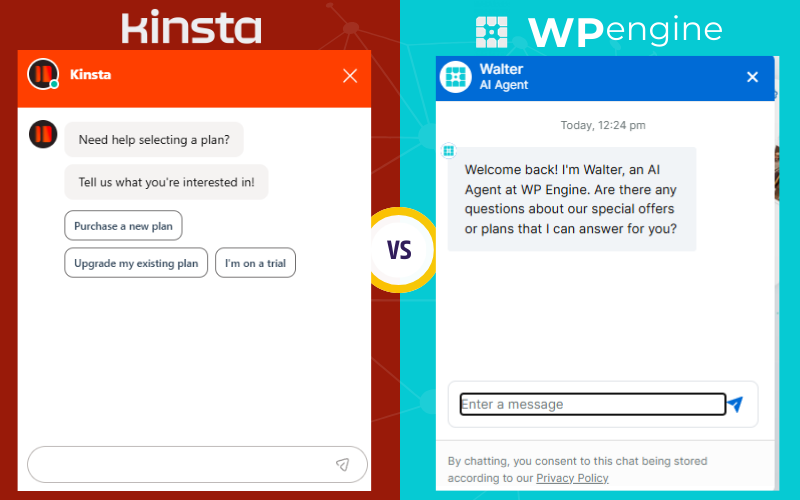
When choosing a premium WordPress host, support quality can be just as important as performance. In the kinsta vs wpengine comparison, both providers offer expert support teams, but the experience you get from each can differ. Here’s a clear breakdown of how their customer support stacks up.
Support Channels & Availability
Kinsta
- Provides 24/7 live chat support for all plans.
- Support is available directly through the MyKinsta dashboard.
- Responses are handled by WordPress‑experienced technicians.
WP Engine
- Offers 24/7 support via live chat and phone (phone support depends on plan level).
- Support access is from the WP Engine dashboard.
- Higher plans include priority support or dedicated assistance.
Both platforms aim to resolve issues quickly, but the availability of phone support with WP Engine can be beneficial for users who prefer verbal communication.
Expertise & Response Quality
One of the key differences in the kinsta vs wpengine support comparison is the depth of technical expertise:
- Kinsta’s support team is WordPress‑specific and focused on managed hosting issues, performance help, and troubleshooting.
- WP Engine’s support team also specializes in WordPress and can assist with more advanced development and hosting questions, especially on higher‑tier plans.
Both teams are trained to handle WordPress‑related problems, but some users find WP Engine’s broader developer support helpful if they require deeper technical insights.
Response Times & SLAs
Support speed matters when your site is down or experiencing issues:
- Kinsta is known for fast response times via live chat, usually connecting within minutes.
- WP Engine also responds quickly, though response times may vary by plan level and support load.
Neither host publicly guarantees strict SLA response times for everyday plans, but both prioritize quick resolution for critical issues.
Knowledge Base & Self‑Help Resources
Aside from live support, both hosts provide extensive self‑help materials:
Kinsta
- Offers a rich knowledge base with tutorials, guides, and troubleshooting articles.
- Articles are well‑organized and easy to search.
WP Engine
- Features a comprehensive resource center including tutorials, developer docs, and guides.
- Also has community forums and documentation for advanced workflows.
If you like solving issues independently, both hosts have strong documentation; WP Engine’s is often more detailed for developer workflows.
Dedicated & Priority Support
For users with higher needs, such as agencies or enterprise sites:
- Kinsta offers dedicated support engineers for certain plans or add‑ons.
- WP Engine includes priority support or dedicated account managers on premium plans.
This means quicker access to senior technicians and personalized support for complex environments.
In the customer support comparison of kinsta vs wpengine:
- Kinsta provides excellent 24/7 chat support with WordPress‑focused technicians and fast response times.
- WP Engine offers 24/7 support with live chat and phone options, with priority and dedicated support for higher plans.
Both hosts deliver high‑quality support, but your preference may depend on whether you value speed and simplicity (where Kinsta shines) or advanced technical and phone support (where WP Engine can have an edge on higher plans).
Developer-Friendly Features
For agencies, freelancers, and tech-savvy WordPress users, developer tools can be a deciding factor in the kinsta vs wpengine comparison. Both hosts provide features that streamline development workflows, improve testing, and simplify deployment, but their approaches differ slightly.
Kinsta offers a highly developer-focused environment with SSH access, WP-CLI support, Git integration, and multiple staging environments. Developers can create staging sites with one click, test changes, and push updates to production without affecting the live site. The ability to switch PHP versions easily also helps when testing plugins or themes in different environments.
WP Engine also provides strong developer tools including staging environments, SSH and SFTP access, Git deployment, and support for WP-CLI. In addition, WP Engine has proprietary developer-focused features such as Local by WP Engine, a local development environment that allows developers to build and test sites offline before deploying to production. Their platform also includes debugging tools and performance insights that help optimize code and troubleshoot issues quickly.
Both Kinsta and WP Engine make it easy to manage multiple sites for clients or projects, but Kinsta’s container-based infrastructure ensures consistent resource allocation, which is particularly useful when testing complex plugins or high-traffic scenarios. WP Engine’s additional integrations, like Local and advanced debugging tools, may appeal more to developers who prefer a fully integrated ecosystem with offline development capabilities.
In the developer-friendly features comparison of kinsta vs wpengine, Kinsta is often praised for simplicity and performance consistency, while WP Engine stands out for extra tools and integrations that support advanced development workflows.
Uptime & Reliability
When comparing kinsta vs wpengine, uptime and reliability are essential factors that can make or break your website’s success. Whether you’re running a business site, blog, or eCommerce store, consistent uptime means visitors can always access your content — and you won’t lose traffic or revenue due to server issues.
Uptime refers to the amount of time your website remains accessible and operational. It’s typically measured as a percentage — for example, 99.9% uptime means your site could theoretically be down for up to 43 minutes per month. Premium hosts like Kinsta and WP Engine aim to keep downtime as close to zero as possible.
Kinsta’s hosting platform is built on Google Cloud’s premium network, which is known for enterprise‑grade reliability and global redundancy. This means servers are spread across multiple data centers, reducing the risk of outages, redundant systems ensure that if one component fails, another takes over, and built‑in monitoring checks your site’s status every few minutes to catch issues early. Kinsta doesn’t publicly guarantee a specific uptime percentage for standard plans, but real‑world performance shows high reliability with minimal downtime.
WP Engine also uses top cloud infrastructure from providers like Google Cloud and AWS, depending on your plan. These platforms are built for high availability and can handle large volumes of traffic without sacrificing uptime. WP Engine includes features such as global load balancing, redundant server infrastructure, and proactive monitoring. These systems work behind the scenes to help keep your site online even during unexpected traffic spikes or infrastructure issues.
Both Kinsta and WP Engine include proactive monitoring that checks your site frequently. If an issue is detected, Kinsta will automatically alert support and begin troubleshooting processes, while WP Engine uses internal tools to identify problems quickly and trigger fixes or escalation to technical staff. These monitoring systems are critical for maintaining uptime and preventing small problems from becoming major outages.
In the kinsta vs wpengine comparison, historical uptime data from third-party monitoring services shows that both providers consistently achieve uptime rates well above industry averages for shared hosting. While occasional brief downtimes can occur with any host, both Kinsta and WP Engine have strong track records of keeping sites live and performant.
Migration Process
A smooth migration process is a critical consideration when comparing kinsta vs wpengine, especially if you are moving an existing WordPress site. Both hosts offer tools and support to make the transition as seamless as possible, but their approaches differ in convenience and level of assistance.
Kinsta provides free professional migrations for all plans, handled by their expert migration team. Users simply fill out a form with their current site details, and Kinsta manages the migration from start to finish, including databases, files, and configurations. For smaller sites or technical users, Kinsta also offers a plugin-based manual migration option, giving flexibility to handle transfers independently if preferred.
WP Engine also offers free migrations, but the process can vary slightly depending on your plan. They provide a migration plugin called the WP Engine Automated Migration tool, which allows you to migrate your site yourself without technical knowledge. Additionally, their support team can assist with more complex migrations or enterprise-level websites. Both manual and automated options are available to suit different user needs.
Both Kinsta and WP Engine ensure minimal downtime during migrations. They provide staging environments where you can test your site after migration before pushing it live. This allows you to verify that everything is working correctly, including plugins, themes, and custom configurations.
In the migration process comparison of kinsta vs wpengine, Kinsta is often praised for its fully managed, hands-off migrations by experts, making it ideal for users who want a hassle-free transfer. WP Engine offers flexibility through automated plugins and support assistance, which can be beneficial for those who prefer partial control or have complex sites. Both providers make the process straightforward, reliable, and secure, reducing the risks associated with moving WordPress websites..
Included Features & Add-Ons
When evaluating kinsta vs wpengine, understanding the features and add-ons included with each plan is essential for determining overall value. Both hosts provide a suite of tools designed to improve performance, security, and workflow, but the specific offerings and how they are bundled differ.
Kinsta includes many premium features by default in all plans. These include a built-in CDN, daily automatic backups, staging environments, site analytics, free SSL certificates, and hack-fix guarantees. Kinsta also offers optional add-ons such as Redis, additional backups, and premium support options, but most essential tools come included, reducing the need for extra purchases.
WP Engine provides a wide range of included features as well. Core offerings include EverCache® technology for performance optimization, staging environments, daily backups, security monitoring, and free SSL certificates. Some plans also include a global CDN, but for others, CDN access may require an additional add-on. WP Engine also offers premium developer tools and integrations such as Local by WP Engine for local development.
Both hosts include advanced security tools, analytics, and developer-friendly utilities, but the way these features are packaged can influence which platform represents better value for your specific needs. Kinsta tends to bundle more features in the base plan, while WP Engine provides some features as optional add-ons or higher-tier plan benefits.
In the included features & add-ons comparison of kinsta vs wpengine, Kinsta is generally praised for including most essential tools in every plan, making it straightforward for users who want a complete solution out of the box. WP Engine offers powerful capabilities and developer tools, but some may require additional plan upgrades or purchases. Understanding which features you need most can help you choose the host that provides the best overall value.
Pros and Cons: Kinsta vs WP Engine
When evaluating kinsta vs wpengine, it’s helpful to look at the strengths and weaknesses of each platform to determine which is the best fit for your WordPress site.
Kinsta Pros include a modern, intuitive dashboard (MyKinsta) that makes site management easy, isolated container-based hosting for consistent performance, built-in CDN and caching, daily automatic backups, strong security measures, and excellent 24/7 support via live chat. Its plans include most essential features without needing additional add-ons, making it ideal for businesses and agencies seeking predictable performance and simplified management. Kinsta Cons include higher pricing compared to basic shared hosting, limited phone support, and no multi-cloud options as it is exclusively on Google Cloud, which might be a consideration for enterprises seeking diverse infrastructure.
WP Engine Pros include robust performance with EverCache® technology, flexible cloud infrastructure with options on Google Cloud and AWS, staging environments, developer-friendly tools including Local by WP Engine, SSH and Git support, and 24/7 support with phone access on higher-tier plans. WP Engine also integrates well with premium plugins and offers advanced analytics and performance monitoring. WP Engine Cons include slightly complex pricing structure with some features requiring higher-tier plans or add-ons, the dashboard can feel overwhelming for beginners, and certain features like CDN access are not always included in base plans.
In the pros and cons: kinsta vs wpengine comparison, Kinsta is often recommended for users who want a simplified, high-performance experience with most features included, while WP Engine is suited for users who value flexibility, advanced developer tools, and enterprise-level features even if it comes with a steeper learning curve.
Which Is Better: Kinsta or WP Engine?
In the final stage of this Kinsta vs wpengine comparison, the answer depends entirely on your priorities. Both managed WordPress hosts are excellent, but they shine in slightly different areas that make one a better choice for certain users and use cases.
If your priority is performance consistency, ease of use, and predictable pricing, then Kinsta often comes out ahead in the wpengine vs kinsta comparison. Kinsta’s containerized infrastructure on Google Cloud, intuitive dashboard, and included premium features (like CDN and daily backups) provide a powerful all‑in‑one solution that’s simple to manage without needing add‑ons. This makes Kinsta great for agencies, business websites, and users who want strong performance without a steep learning curve.
On the other hand, WP Engine may be a better fit if you value flexibility, advanced developer tools, and enterprise‑level options. Its strength lies in powerful caching (EverCache®), support for multiple cloud providers (Google Cloud and AWS), integrated development tools like Local by WP Engine, and expanded support options including phone support on higher tiers. These features make WP Engine appealing for developers, larger teams, and complex or resource‑intensive sites that benefit from customizable workflows.
In terms of support, both hosts provide 24/7 assistance, but Kinsta’s live chat tends to be highly praised for responsiveness while WP Engine’s higher plans include access to priority and phone support. Regarding pricing, Kinsta generally offers clearer, more inclusive packages while WP Engine’s pricing can feel more modular with add‑ons and plan upgrades needed for certain advanced features.
Ultimately, the answer to which is better: Kinsta or WP Engine comes down to your specific needs: choose Kinsta if you want streamlined performance, simplicity, and value, or choose WP Engine if you need flexibility, deeper developer features, and scalable enterprise tools.
Conclusion
Choosing between Kinsta vs wpengine ultimately comes down to understanding your priorities. Kinsta stands out for its consistent high performance, intuitive dashboard, built-in features, and simplified pricing, making it an excellent choice for business owners, agencies, and users who want a reliable, all-in-one solution. WP Engine shines with advanced developer tools, flexible cloud infrastructure, and enterprise-level features, appealing to developers, larger teams, or sites with complex workflows that require customization and scalability.
In the debate of Kinsta vs WP Engine, both platforms provide robust solutions tailored to different user needs. Kinsta excels in delivering user-friendly management with its intuitive interface and comprehensive built-in features, making it ideal for those seeking a straightforward hosting experience. Conversely, WP Engine offers a powerful suite of tools designed for developers, emphasizing customization and scalability for complex projects. Thus, the choice between these two hosting providers should be guided by your specific requirements and the degree of technical flexibility you seek.